How can we help?
General Investment Account
With a MEXEM GIA, you can invest in global shares, ETFs, bonds, and exchange-traded commodities (ETCs) across 150+ markets in 33 countries.
You can also hold and trade in multiple currencies, providing true flexibility for global portfolios.
There are no contribution limits on a General Investment Account. You can deposit and invest any amount, at any time.
Unlike an ISA, a GIA doesn’t offer tax exemptions, capital gains and dividends may be subject to UK tax based on your personal circumstances.
You can access your GIA through any of Mexem’s connected platforms:
Trader Workstation (TWS) for advanced analytics and order management.
Client Portal for portfolio monitoring and simple trade execution.
Mexem Mobile App for trading and alerts on the go.
All platforms are backed by Interactive Brokers’ infrastructure, ensuring secure and efficient trading under FCA oversight.
You can fund your account by bank transfer in GBP, EUR, or other major currencies.
Withdrawals are processed securely to your verified bank account via the Client Portal.
If you already have investments elsewhere, you can also transfer your existing holdings in-specie to Mexem UK without liquidating your assets
There is no mandatory minimum deposit or account balance requirement for opening a General Investment Account (GIA) with Mexem.
You can start investing with whatever amount you’re comfortable with.
General Enquiries
Through your MEXEM UK General Investment Account you can trade stocks, ETFs, and bonds on over 150 global exchanges.
Stocks & Shares ISA accounts are limited to HMRC-eligible securities.
You can place market, limit, stop, and trailing stop orders, along with advanced algorithmic orders on eligible platforms.
The SmartRouting system automatically seeks the best available price and execution venue.
Some advanced order types may only be available to elective professional clients or specific markets.
Margin trading is available only for General Investment Accounts (GIA) that meet suitability criteria.
ISA accounts must remain cash-based and cannot use margin or leverage under HMRC rules.
Margin use involves additional risks. Ensure you understand margin requirements before trading.
To deposit funds into your account, you must first notify MEXEM of your intended deposit through the Client Portal. This ensures your funds are properly credited once received.
How to Deposit Funds:
Log in to Client Portal / Account Management
Navigate to Transfer & Pay > Transfer Funds
Click on Deposit Funds
From the dropdown menu, select the currency you are depositing (e.g., GBP, USD, EUR).
Choose the deposit method
Click the “How to” button for step-by-step instructions specific to that method.
Follow the on-screen instructions to generate your deposit notification.
This includes:
The bank account details that you will need to send the funds to
Your MEXEM account reference, which must be included in the bank transfer
Important Information:
• Your bank will not automatically send funds. You must initiate the transfer manually through your banking provider.
• When initiating the transfer, you may need to provide:
The sending bank's account name and number
The amount being transferred
The MEXEM account number or reference code
Ensure your name on the sending account matches your MEXEM account name to avoid delays.
No, MEXEM UK does not charge platform, custody, or inactivity fees on any account type.
You only pay low trading commissions and FX conversion costs when applicable.
Your first withdrawal each calendar month is FREE; additional withdrawals may incur a small fee depending on the payment method.
Please note that exchange, regulatory, or third-party charges may still apply when trading on specific markets or instruments.
All fees are clearly displayed before order submission and detailed in your trade confirmations and monthly statements.
Fees & Interests
Yes. You can log in securely from multiple devices — desktop, laptop, tablet, or smartphone — and your account will stay synchronised in real time.
Positions, balances, and watchlists update instantly across all platforms.
Client money segregation ensures that your funds are held in accounts separate from the company’s assets and cannot be used for company obligations.
This approach helps protect clients if MEXEM were to become insolvent.
When you open an account and use Trader Workstation (TWS), you’re automatically subscribed to several complimentary FREE real-time data services, these are.
- IDEALPRO FX (IDEAL PRO)
- US and EU Bond Quotes (Level 1)
- IEX Depth of Book (Level 2)
- PAXOS Cryptocurrency
- US Real-Time Non-Consolidated Quotes (IBKR-PRO)
- Alternative European Equities (Level 1)
All clients are also automatically enabled for Snapshot Market Data, which lets you view on-demand real-time quotes - no monthly subscription needed.
- $0.01 per U.S. equity snapshot
- $0.03 for all other product snapshots
- First $1.00/month in snapshots is free
- You will see a "Snapshot" button on your platform for eligible instruments
Snapshot quotes can be useful if you don’t need continuous streaming data.
You can view FREE delayed data for most markets and subscribe to real-time data feeds directly from your account settings.
Subscription costs vary by exchange, and you’ll see the price clearly before confirming any data package. See the following steps to subscribe to market data from your client portal:
> Click the Person icon on the top right of the screen
> Click on Settings followed by Market Data Subscriptions
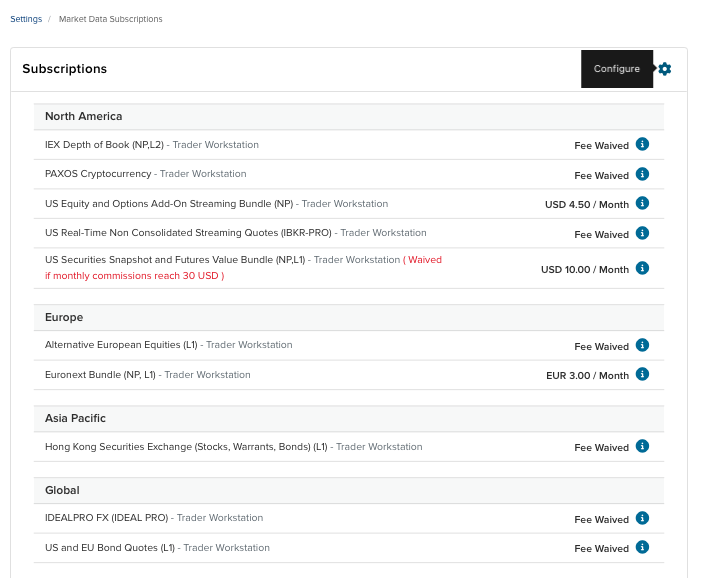
> Click on the Configure button next to Subscriptions (See image: “Subscriptions”)
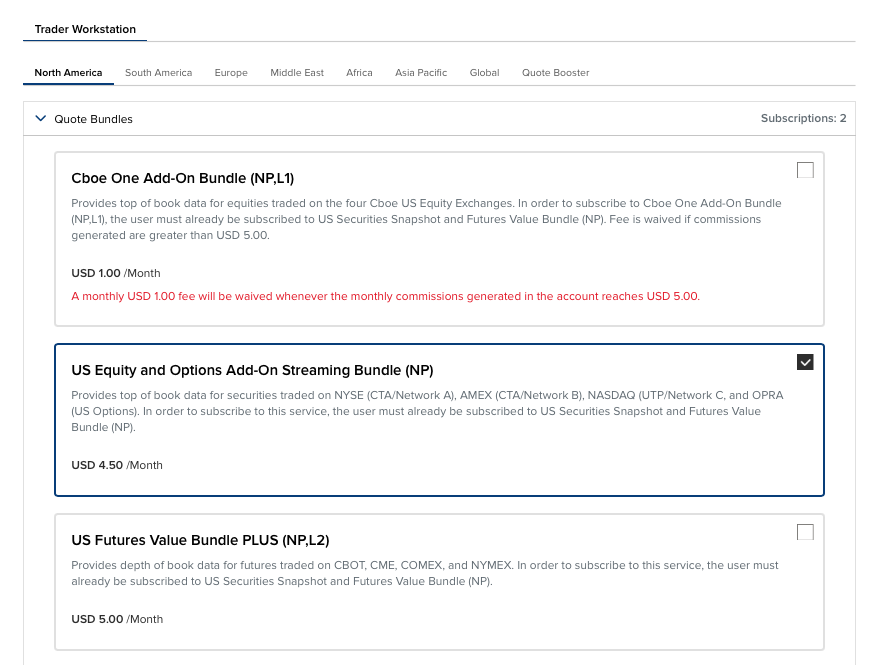
> You will then be able to choose from the drop downs various subscriptions (See image: "Choose Subscriptions")
> Make sure to tick the relevant subscription and click Continue at the bottom left of the page.


No. All MEXEM trading platforms: desktop, web, and mobile are FREE to use.
You only pay low trading commissions when you execute trades and subscribe to Live Market Data. There are no platform, subscription, or inactivity fees.
MEXEM uses two-factor authentication (2FA) and encrypts all communications to protect your login sessions. You should also choose strong, unique passwords and monitor your account activity regularly.
Stocks & Shares ISA
Every order you place is powered by IBKR’s SmartRouting, which continuously scans multiple trading venues to secure the best available price in real time.
Unlike market makers or commission-free apps, MEXEM does not sell order flow, ensuring transparent, best-execution standards on every trade.
For advanced users, you can also direct your orders to specific exchanges or venues, giving you complete control over where and how your trades are executed.
Yes. MEXEM UK allows seamless trading across 20+ currencies.
You can automatically convert GBP at live interbank rates with a minimal 0.2% FX markup (excl ISA), or hold multi-currency balances to manage exposure and reduce conversion costs on global portfolios.
For Stocks & Shares ISA accounts, holdings must remain in GBP. When you trade in a foreign currency, an auto-FX conversion is applied at 0.25% plus any third-party fees.
Yes. You can easily transfer both cash and existing investment positions from another broker to MEXEM UK.
Stock & ETF transfers: Most UK and international listed securities can be transferred in-kind.
Cash transfers: Supported in GBP, EUR, and other major currencies, credited directly to your MEXEM UK account.
ISA transfers: We accept Stocks & Shares ISA transfers from other ISA managers, with no exit or entry fees from our side.
Yes. Eligible clients can apply to be classified as an Elective or Per Se Professional Client under FCA COBS 3.5.
This provides access to greater leverage, subject to FCA suitability criteria.
No - The General Investment Account (GIA) has no contribution limit. You can deposit and invest any amount, at any time.
Unlike an ISA, however, any capital gains, dividends, or interest earned in a GIA may be subject to UK tax.
Product
Accounts are able to participate but cannot exceed the annual ISA subscription limit. If it were to exceed the subscription limit, the shares should be transferred to a non-ISA account.
They can be transferred to your linked General Investment Account that is created when opening an MEXEM Stocks & Shares ISA account.
Margin trading is not permitted within a Stocks and Shares ISA.
HMRC rules require that all investments held within an ISA must be fully paid for using available cash in the account. Borrowing to invest (also known as leverage or margin) is not allowed under ISA regulations.
This ensures your ISA remains compliant with the UK’s tax-free savings rules.
For the 2025/26 tax year, the Junior ISA annual allowance is £9,000.
This limit applies across all Junior ISAs your child may hold, including both cash and stocks & shares accounts.
Parent or legal guardian:
Opens the account and acts as the registered contact.
Ownership:
All contributions belong to the child.
Access:
Funds remain locked until the child turns 18, at which point the Junior ISA automatically converts into an adult Stocks & Shares ISA.
A Junior ISA (JISA) is a tax-free savings and investment account designed to help you build a secure financial future for your child. Any money you invest grows free from Income Tax and Capital Gains Tax, making it one of the most efficient ways to save for their future.
There are two types of Junior ISAs available in the UK:
Junior Cash ISA – earns tax-free interest.
Junior Stocks & Shares ISA – lets you invest in a wide range of qualifying investments such as shares, ETFs, funds, and bonds.
At MEXEM, we will soon offer a Junior Stocks & Shares ISA that gives you access to 150+ global markets, 33 countries, and 23 currencies, all through our powerful trading platforms.
Platform
TWS is compatible with Windows, macOS, and Linux.
You will need a stable internet connection and the latest Java runtime (bundled during installation).
The platform updates automatically to ensure optimal performance and security.
Yes. The MEXEM App, powered by Interactive Brokers technology, allows you to trade, monitor markets, and manage your portfolio from any iOS or Android device.
You can also receive notifications and price alerts directly on your Apple Watch.
Advanced users can access the Mexem API, which supports FIX, REST, and Excel integrations.
This allows for custom workflows, automated trading, and connectivity with third-party software — all secured through encrypted connections
No. All MEXEM trading platforms: desktop, web, and mobile are FREE to use.
You only pay low trading commissions when you execute trades and subscribe to Live Market Data. There are no platform, subscription, or inactivity fees.
Yes. You can log in securely from multiple devices — desktop, laptop, tablet, or smartphone — and your account will stay synchronised in real time.
Positions, balances, and watchlists update instantly across all platforms.
Safety
Client money segregation ensures that your funds are held in accounts separate from the company’s assets and cannot be used for company obligations.
This approach helps protect clients if MEXEM were to become insolvent.
MEXEM uses two-factor authentication (2FA) and encrypts all communications to protect your login sessions. You should also choose strong, unique passwords and monitor your account activity regularly.
No. The value of your investments can go down as well as up depending on market performance.
FSCS and FCA protections cover firm or custodian failure, not normal investment risk.
You should always ensure your chosen investments align with your risk tolerance and goals.
MEXEM uses bank-grade encryption, two-factor authentication (2FA), and real-time session monitoring to safeguard your account.
All data is transmitted securely using TLS encryption and stored in compliance with UK GDPR.
You can enable biometric login on mobile and receive instant alerts for account activity for extra peace of mind.
Trading
No, the only ISA account type that MEXEM offers is a non flexible Stocks and Shares ISA account. That means you can take money out, but it will count towards your annual ISA allowance if you pay it back in the same tax year.
Yes. The MEXEM App, powered by Interactive Brokers technology, allows you to trade, monitor markets, and manage your portfolio from any iOS or Android device.
You can also receive notifications and price alerts directly on your Apple Watch.
Advanced users can access the Mexem API, which supports FIX, REST, and Excel integrations.
This allows for custom workflows, automated trading, and connectivity with third-party software — all secured through encrypted connections
TWS is compatible with Windows, macOS, and Linux.
You will need a stable internet connection and the latest Java runtime (bundled during installation).
The platform updates automatically to ensure optimal performance and security.
Yes, you will need a National Insurance Number (NINO) to open an ISA account.
Please Note:
If not already listed then you need to enter the National Insurance Number in the Tax ID section of your profile to open a linked ISA account.
Otherwise the system will return an error if you do not.
See the following steps from your Client Portal:
Click the Person icon on the top right of the screen
> Settings
> Account Settings followed by Account Profile
> Profile Followed by the Pencil Icon to Edit your Profile information
> In the Tax Residency section you may edit the information or remove Tax Residency and add another Tax Residency

We’re here to help.
Don’t hesitate to reach out

United Kingdom

Belgium
Kunstlaan 56, 1000 Brussel. België
Bezoekadres (alleen op afspraak): Piers de Raveschootlaan 113 8300 Knokke-Heist

Cyprus

France

Italy

Netherlands

Spain
Secure & Regulated Trading